Everything Condor does
Every feature, in plain words.
This is what the app does today, tied back to the Behavior Scorecard and Outcomes. And at the bottom, what it does not do.
HIPAA-ready · SOC 2-ready · Screens show sample data only
Everything Condor does
Each item says the problem it solves. Click any item to see it on its page.
Behavior scorecard
- Scorecard home — Floor staff see today's points and log a strength or a concern without leaving the board.
- Two-tap entry — A rating, then a resident, records the moment while the shift is still happening.
- Unit-wide rating — One rating can apply to a whole cottage when the same thing happened for the group.
- Full behavior log — A longer note, including safety behaviors, is filed when two taps are not enough.
- Behavior reports — Supervisors can find the report behind a score.
- Void a score — A supervisor can undo a mistaken entry without erasing the audit trail.
- Quick Log on the person — Staff stay with one young person and keep logging.
- Seven-day campus line — The cottage sees whether the week is up or down, with the numbers in a table.
- Printable scorecard — A shift can hand someone a paper copy of today's board and the seven-day line.
- Scorecard CSV — The same board can leave as a spreadsheet.
- Live refresh — The open board polls about every 8 seconds so a second device sees a new log. There is no websocket.
Dashboard, list, and resident trends
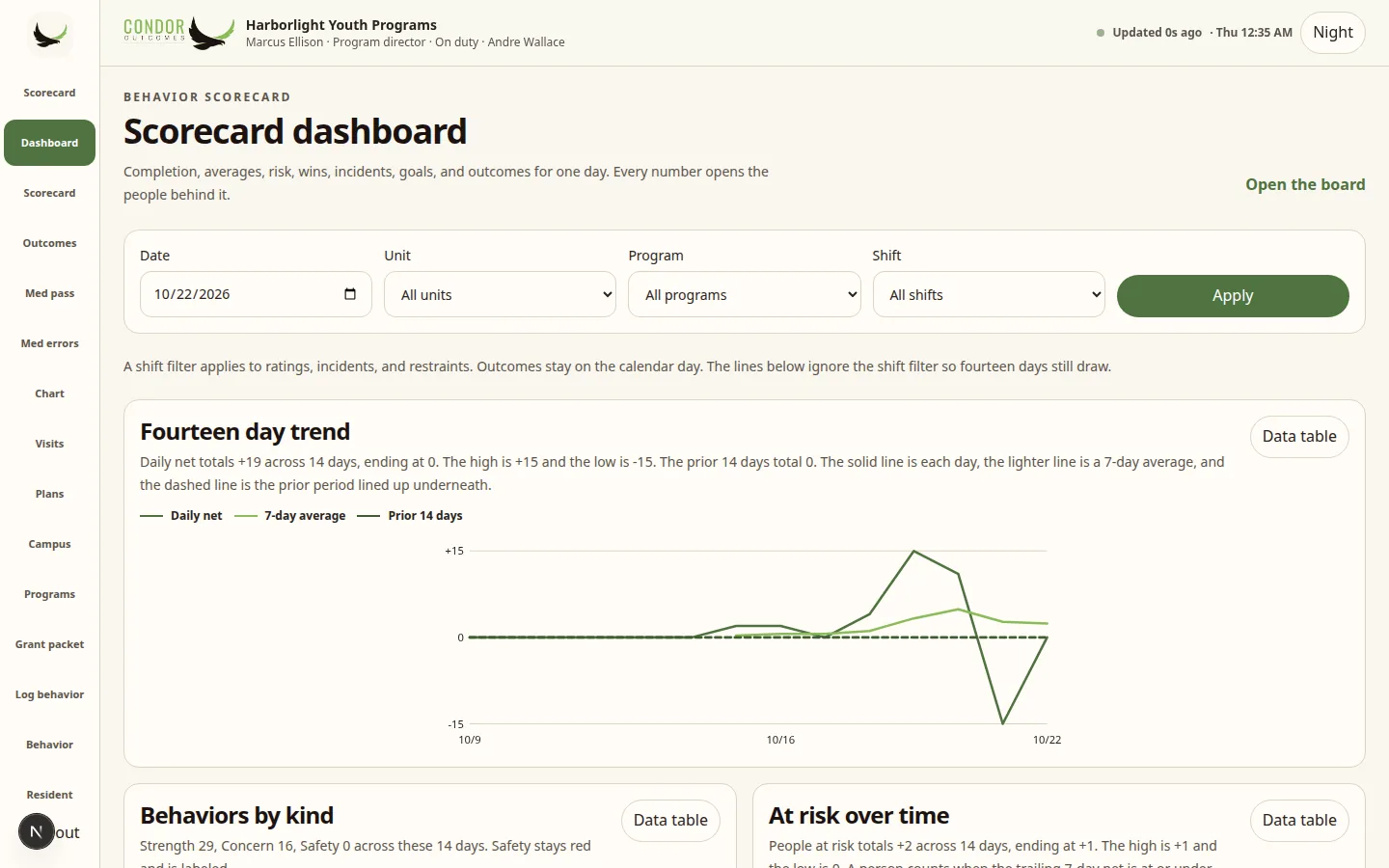
- Scorecard dashboard — A director sees one day: completion, average, wins, incidents, restraints, goals, and outcomes, and each number opens the people behind it.
- Fourteen-day trend — Daily net, a 7-day moving average, and the prior 14 days sit on one line. A shift filter does not blank the line.
- Behaviors by kind — Strength, concern, and safety are stacked and labeled so safety is never only a color.
- At risk over time — The count of people at the at-risk rule (trailing 7-day net at or under -12, or 4 concern days) is drawn across 14 days.
- Ratings completion by shift — Each recent shift shows how many of the current census were rated.
- Dashboard filters and saved views — Date, unit, program, and shift can be reopened later by the person who saved them.
- Scorecard list — Every admitted resident is one row: today's score, level, week, month, streak, last incident, and goals.
- Week-versus-prior change — The list says up, down, or flat in words, next to the arrow.
- List sort, search, and risk filters — Staff can find who is missing a rating or who is at risk.
- Resident list CSV — That list exports without photos. Photos are not stored.
- Resident 30-day line — One person's net, a 7-day average, published level bands, incident marks, and medication-start marks.
- Behavior bars — The behaviors that moved the score the most are listed with their points.
- Strength and concern calendar — Each recent day is Up, Down, or Quiet in words.
- Unit small multiples — Each cottage's 14-day net is a small line.
- Program small multiples — Each program's 14-day net is a small line.
Outcomes and proof for funders
- Outcomes board — Wins from every desk are counted against the prior 30 days, with concerns and safety kept in the count.
- Start versus now — Each domain shows whether wins moved up, down, or stayed flat.
- Four-week cohorts — Wins by program are split into four weeks.
- Length of stay versus change — Days in care are plotted against change since intake, labeled with a first name and last initial.
- Program outcome drill-down — One program's wins open on their own.
- Printable outcomes — The same board, including the charts, can be printed for a funder.
- Outcomes CSV — The window exports as a spreadsheet.
- Domain rename — An agency can call a domain by its own word.
- Grant packet — Grant-ready strengths and program wins for the month are one table. Restricted safety plans stay a count, not a story.
- Grant notes by program — The month's notes are counted by program above the table.
- Grant CSV — That packet downloads.
- Week sentence — The director home states the week in one sentence composed from stored counts. A model is used only if is set. No key is shipped.
- Command deck — Grant-ready notes, high risk, and program totals sit under the scorecard for a director.
Programs
- Program catalog — An agency turns on only the lines it runs.
- Residential cottages — The unit, the shift, and what went right today, plus a QRTP designation note and a 30-day review that are internal notes, not a state certificate.
- Therapeutic foster homes — Home study, certification date, training hours, placement match, respite, and permanency stay with the home.
- Day school — Attendance, IEP goals, and education notes are one period at a time. This is not a student information system.
- Community and prevention — A visit note starts with what went well and keeps a case plan.
- Clinic — A counseling contact is separate from the medication pass.
- Independent living — Skills, aftercare, and work hours are a checklist the agency writes.
- Juvenile justice — An internal case and incident. Condor does not file with a court.
- 29-I health home — A care-management touch. The note is not a claim and not a state file.
- Official-file lists — 837, 29-I claims, CONNECTIONS, court e-filing, a student information system, NSP/LSP packets, Fair Futures, and a state QRTP certificate are named internal lists, not those official files.
- Practice models — The agency writes its own checklist and caseload limit. Condor does not certify a model and does not include a licensed manual.
- Enrichment — Animal, farm, music, outdoors, service, or coaching, starting with what went well.
- Points and rewards — The agency names the currency. A grant lands on Wins.
- Specialty cases — Immigration milestones, support goals, rapid re-housing, adult residence, and restricted safety plans. Safety plans for trafficking and harmful behavior are limited to clinicians and directors.
- Resident timeline — One person's program notes sit on the profile in time order.
Floor operations
- Shift open and close — A supervisor starts the shift and ends it with a handoff of wins, concerns, and what is still open.
- Wins this shift — Strengths already logged are the first thing the next shift reads.
- Coverage — Who is here, which hole is still open, and which credential is close to expiring. An expiring card warns. It does not silently block the shift.
- Shift notes — Strengths come first, concerns stay on the same note, and the author signs when the sentence is theirs.
- Signed shift note — The signature meaning is stored with the note: the author attests the note is accurate.
- Headcount — A supervisor starts a count from the last known place of each admitted resident. It does not invent blank rows.
- Census grid — A month of counts can be reviewed by year and month.
- Census CSV — Billing can take the count out as a spreadsheet.
- Off property — A checkout names the resident and the destination. The agency name comes from settings.
- My kids — Direct care sees the young people on their shift and whether anything was logged.
- Today on the floor — A supervisor sees every unit under the scorecard.
- Approvals — Behavior reports and restraint reviews wait for a supervisor, who can approve or return them with a comment.
- Follow-ups — An injury flag becomes a nurse task and completing it does not delete the report.
- Intake — A new admission has a profile before the scorecard starts.
- Resident directory — Staff find people by name. Billing sees the directory their role allows, with identifiers masked.
- Presence and allergy alert — The floor sees where someone is and a short allergy warning.
Incidents and crisis
- Incident case — An incident is the case. Behavior reports and restraint reviews hang off it, and a case number is assigned on save.
- Incident and restraint trend — 28 days of incidents and restraints are two labeled lines.
- Day-of-week and hour — Incident counts are shown as labeled cells, with the number in the cell, not color alone.
- Crisis and restraint — A physical intervention opens one record. The type is entered once, then the timer and the review.
- Restraint trend — The same 28-day restraint line sits on the crisis list.
- Mobile crisis calls — A call records place, times, what went well, and the next step. It is not a dispatch system.
Health, medications, and plans
- Med pass — Due doses, recent passes, and follow-ups are the nurse's board.
- Med errors — A wrong scan is recorded and the dose is not marked given.
- Chart forms — Required fields have to be filled before a draft or a submitted form is stored.
- Visits — ER and a routine appointment are different forms.
- Plans and goals — What helps, what to avoid, and goals counted from the daily log.
- Plan signature — A reviewer can sign that the plan matches the care being provided.
- Chart packet — One resident's chart forms, recent passes, visits, allergy, goals, and signatures already on the record.
- Chart CSV — That packet downloads.
- Clinician caseload — Who is moving and who needs the clinician, with the plan still in draft called out.
Family, shares, and support
- Family messages — A message stays held until someone releases it. It is not emailed.
- Guardian portal — A linked guardian sees released messages and good news for their child. The chart, medications, and other residents stay off the page.
- Share sheet — Staff choose what leaves the cottage, including clinical sections only for roles allowed to release them.
- Support portal — A support person sees only the sections a grant released, for a limited time.
- Support entry — A grant is opened from a link, not from the staff app.
- Support export — The released sections can download.
- Support grants — An agency admin approves a time-boxed, read-only look at a workspace.
Training and credentials
- Credentials — Expiry is written in words. A lapsed card warns the floor and does not lock someone out of a shift.
- Coverage warning — The same expiry shows on the open shift hole.
Reports and audit exports
- Month packet — Incidents, restraints, finished medication passes, and grant-ready notes are counted from stored records. The page says this is not a state filing and not a specific state's form.
- Month count CSV — Those four counts download.
- Audit log — Reads and writes of protected information are appended. Each row includes the hash of the previous row for this agency. Reveals of SSN or CIN are marked.
Settings, users, and billing
- Agency settings — Name, what the agency calls young people, city, state, phone, and units. Passwords, authenticator seeds, and card numbers are never shown.
- Location program — A unit is tied to the program it runs.
- Scorecard rebuild — An admin can replay the ledger into the cached totals.
- Users — Each person has their own login and roles. There is no shared access code.
- Scorecard templates — Behaviors, weights, a rating scale, levels, and thresholds are drafted and then published. Publishing changes future logs. Points already stored stay as they were. A template can be copied onto another program.
- Onboarding checklist — A new agency walks locations, programs, and the rest of setup before the floor is the home.
- Billing — Scorecard is $299/month billed annually ($369 month-to-month), and Scorecard + MAR is $449/month billed annually ($549 month-to-month). The trial is 14 days. Stripe runs only with a test key. No live charge is made from this app.
Connections
- Chart connections — A hospital or clinic chart can share allergies and medications, and the cottage can share what is going well. Nothing leaves until someone writes down consent.
- Connection detail — One connection shows consent and what has moved.
- FHIR R4 — The app exposes a SMART-on-FHIR style metadata and resource API for the connected chart. Routes under .
- Public sandbox read — Capability statements can be read from public FHIR bases. No Epic listing, no QHIN, no TEFCA, no production , no Bulk FHIR export, no HL7 listener, no C-CDA, and no Direct.
- 42 CFR Part 2 default — Part 2 covered records are blocked unless a recorded consent explicitly allows them. The product does not enable a Part 2 program by default. This is not a Part 2 certification.
Security controls
- Per-tenant row-level security — Postgres forces row-level security on the application tables. One agency's query does not return another's rows. The application role cannot bypass that policy.
- Own login and MFA — An authenticator code is required. Demo logins can fetch a code only when .
- Confidentiality oath — Staff accept a dated statement before they open records.
- Role permissions — The role, not a shared password, decides chart, scorecard, billing, templates, and family.
- Location scope — A direct-care login sees their unit, not the whole agency.
- Session limits — A session ends after 45 minutes idle and 16 hours after it was created.
- Audit hash chain — The audit log is append-only and each row carries the previous hash.
- Encrypted secrets — Passwords are hashed. Authenticator seeds and stored government identifiers are encrypted before they are written.
- Preview gate — If is set, the site asks for it and stores a hashed cookie. Health and the billing webhook stay open. Optional sends noindex.
- Demo notice — The demo tells people not to enter real client information.
- Legal templates — Terms, privacy, a BAA template, and an accessibility template are drafts with a version, not executed agreements.
- Signup consent — Trial signup asks for the terms, the privacy template, and the BAA template before the account exists, and says when a card would be charged.
- Noindex option — A preview host can ask crawlers to stay away.
- Logout — Ends the session.
Roles
- Direct care — Logs the shift for their unit: scorecard, notes, incidents, crisis, census verify, and off-property.
- Shift supervisor — Adds approvals, shift management, census management, reports, credentials view, shares, and void.
- Nurse — Med pass, chart, visits, follow-ups, and chart export. Does not create behavior logs.
- Clinician — Caseload, plans, sensitive view, family messages, and shares. Does not create behavior logs.
- Program director — The supervisor set plus audit, grant packet, templates, chart export, and sensitive view.
- Billing — Census and masked identifiers. No scorecard and no chart.
- Agency admin — Users, settings, billing, audit, templates, credentials, and connections. No scorecard view.
- Platform super-admin — Enters workspaces that asked for help.
- Guardian — Released family messages only.
- Support person — Only the sections a grant released.
Mobile and offline
- Phone navigation — Scorecard roles get Scorecard, Dashboard, List, one role action (Med, Proof, Plans, Log, Wins, or Count), and More.
- Installable app — A manifest and service worker let the phone add Condor to the home screen. The icon and cream background match the brand.
- Offline behavior log — A log typed without a connection waits on the device and files when the connection returns.
- Offline shift note — A note waits in the same on-device queue.
- Queue conflicts — If the server rejects a queued item, the phone keeps the message instead of dropping it.
- What still needs a connection — Charts, medication passes, and census do not queue offline. The scorecard polls. It does not use a websocket.
- Compact charts — Trend drawings reserve a shorter height on a phone and grow on a wider screen so the page does not jump.
- Mobile crisis — Calls are a phone-first form.
Dictation, alerts, census, and languages
- Dictation — A Dictate button under each shift note field uses the browser's own voice dictation. Free, no extra vendor, and only in browsers that support it. Typing works the same.
- Dictation on a phone — The same Dictate button on the phone note form.
- Alert center — One list of alerts, grouped by kind, with a count on the Alerts button in the header. Role-based.
- At-risk alerts — Young people whose trailing score meets the at-risk rule.
- Overdue approval alerts — Behavior reports waiting for approval more than four hours.
- Follow-up alerts — Open incident follow-ups.
- Medication exception alerts — Medication exceptions for the people who act on them.
- Credential expiry alerts — Staff credentials that expire within 30 days.
- Alert delivery — Alerts are on screen. Email and text are logged in test mode and not sent. Text and email channels are coming.
- Daily headcount — Every admitted person by name and unit. Mark remaining present, then record exceptions.
- Daily snapshot — Saved the first time census is opened each day, with the real time saved.
- Month census grid — Each person by day with codes for admission, present, home visit, AWOL, court, hospital or medical, discharge and off property.
- Census CSV for billing — Export the census grid as CSV.
- Occupancy trend — Thirty days of beds, occupied beds and percent full, overall and by unit, with data tables.
- Admissions and discharges — Admissions and discharges by day over 30 days.
- Five languages — English, Spanish, Haitian Creole, Chinese (Simplified) and Russian. Screen text is a draft until a native speaker reviews it.
- Staff language — Each staff member sets their own language.
- Family language — Each family member sets their own language.
- Write in your language — A Written in menu on each note.
- Machine-translated label — Readers in another language see a translation labeled machine-translated.
- Show original — One tap shows the original. The original is kept for the record.
Public site
- Home — States the problem the scorecard solves and how a trial starts.
- Demo — Sample-data walkthrough with a notice not to enter real client information.
- Trial signup — Agency, plan, and consent, then a test-mode or mock checkout.
- Contact — A form to reach support. Messages are not sent as real email from this environment.
Honest limits: not in Condor today
- Text, email or push delivery of alerts. Alerts show on screen in the alert center today, and text and email are coming. They are not sent yet
- E-prescribing through DrFirst: approved and coming soon. It is not live yet
- A full treatment-goal engine or a behavior review committee
- NY 29-I and 837 billing files, official state files and court filing
- A certified electronic-signature product
- White-label domains
- A form builder
- Single sign-on (SSO)
- A completed SOC 2 or HIPAA audit. HIPAA-ready and SOC 2-ready describe the design.
- Charts are drawings of your stored numbers. They are not a clinical decision tool.
It all comes back to the Scorecard
Every log, note, program and report in Condor feeds the Behavior Scorecard, and the Scorecard feeds Outcomes. One record, one picture of how each person is doing.
ScorecardOutcomesProgramsFeaturesFloorIncidentsMedsCensusLanguagesFamilySharingReportsRolesInteroperabilitySecurity
Integrations · Works with your system
Keep your EHR. Add Condor next to it.
Condor runs alongside the system you already use. No rip-and-replace. No data migration. Most programs can start with a file export in days. Condor connects through FHIR or file export where your system provides it, and the connection wizard walks you through it yourself.
Tested against the public Epic, Oracle Cerner and athenahealth sandboxes and generic FHIR servers. A production connection is set up per agency, with your EHR.
Upload a spreadsheet export. Condor maps the columns for you and shows a preview before anything is saved.
Your system drops a file on a schedule. Condor syncs it on its own, shows health status, and retries if a run fails.
Import admit, discharge and transfer messages as files. This is file-based; there is no live HL7 interface listener.
Pick a format, test it on sample rows, review matches, and turn it on. No ticket to file.
Other systems can read from Condor through a standard FHIR R4 API.
1. Scorecard first. Start with behavior tracking and the outcomes Scorecard. Your EHR stays the system of record.
2. Add MAR when ready. Turn on Condor’s eMAR for a house or a whole agency.
3. Add e-prescribing. E-prescribing through DrFirst is approved and coming soon.
Plain truth: Condor uses standard formats. It does not claim certified, official or real-time connections with any named EHR vendor. Systems such as Netsmart, Credible, Therap or PointClickCare can connect via FHIR or file export where your system provides it. How connections work →
See it with your own program in mind
Try the demo: a made-up agency with sample data only, so never enter real client information. Or start a 14-day free trial with your own empty workspace.
Trial terms: no card, sign up yourself. After 14 days you get 3 days of grace, then read-only with your data kept.
Scorecard is $299/mo billed annually. Scorecard + MAR is $449/mo billed annually ($549 month to month). e-Prescribing add-on $79 per prescriber per month, coming soon. 14-day free trial, no card. White-label and partner options available, contact us. See pricing.